
From Prototype to Production I : Deploying a Smart-Home Agent
From local prototype to a deployable multi-service architecture

This is the third lesson of the new open-source series to build a production-grade smart home agent. This is a hands-on journey to building conversational AI agents that control IoT devices using LLMs, LLMOps, and AI systems techniques.
🔗 Learn more about the course and its outline.
In the last lesson, we gave our smart home agent memory: the ability to remember users, their preferences, and past interactions. The agent now knows that Alice likes her bedroom lights dimmed in the evening, and that Bob always cranks up the thermostat before bed.
But everything runs locally. This lesson is about making it real: packaging everything into a deployable service that your household can actually use. Honestly, one post is not enough to cover what is needed for your agent to be ready to face real users. This is why, I think it will be a series of lessons each focusing on one aspect of the deployment pipeline. Today, the focus is to ship the agent as a service and at the end of this lesson, you will have an understanding how you should design a deployment architecture for your agent and you will have a fully running multi-service system.
Let’s get into it.
Deployment Architecture
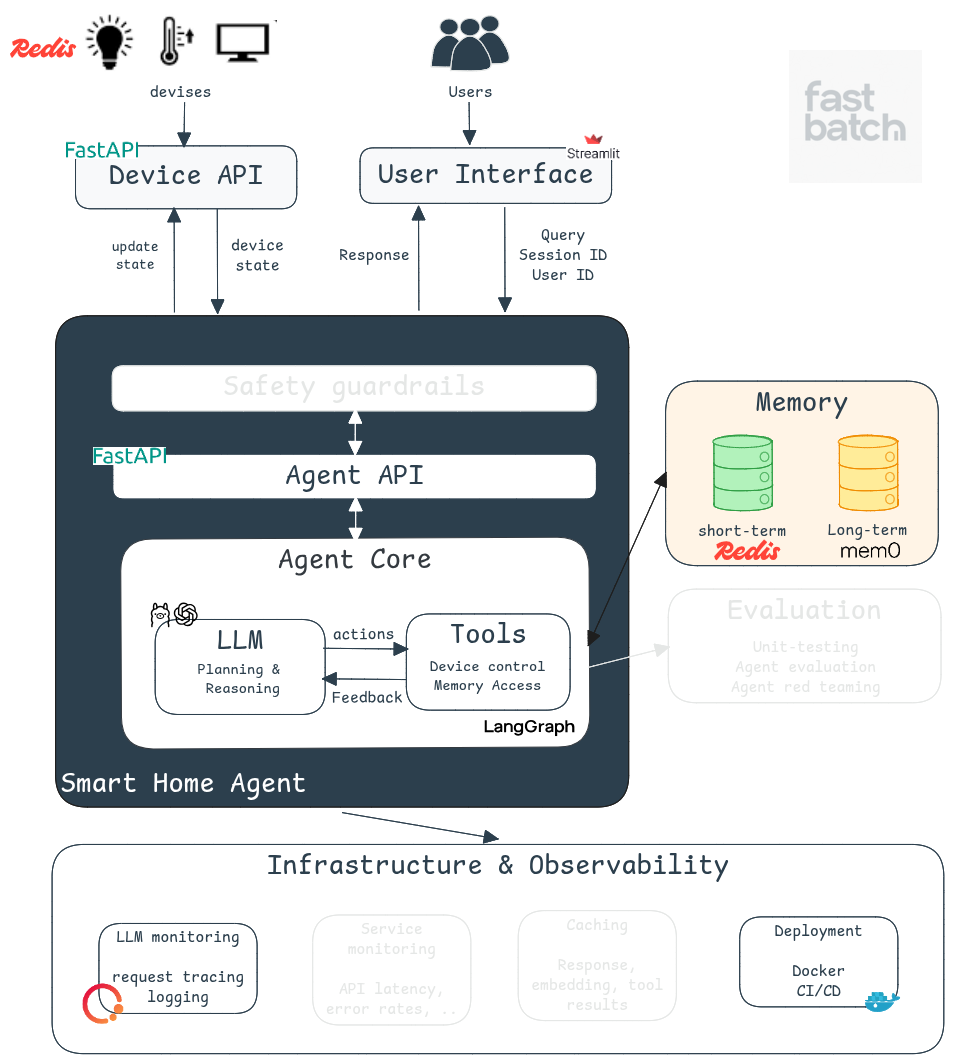
Moving to production is not about wrapping your agent in an API. We need to integrate the agent’s logic into a scallable architecture that connects it to real users. And to have a scalable architecute it is important to seperate the respensibilities of its components. This is why, our deployment consists of three major interconnected services:
Frontend: User Interface with Streamlit
We're using Streamlit to build a lightweight but functional interface. It's a Python framework for rapid frontend development. It is intuitive, fast to iterate on, and a great alternative if you don't have experience with React or JavaScript.
In a real-world company, this would likely be replaced with a dedicated frontend stack. But for educational and rapid prototyping purposes, Streamlit is the right choice.
Our UI is split into two parts. The first is a device dashboard where the user can see the current status of all devices. The second is the chat interface to send queries to the smart home agent. This UI support the following features:
Session management to maintain conversation context
Multi-user support for different household members
Basic user authentication
Once the user logs in, the current home state is fetched from the device state API and displayed. When a query is submitted via the chat interface, a request is sent to the agent API. Once the response comes back, the agent’s answer is displayed and the device status is updated accordingly (see the video for a demo).
Checkout the full implementation here
Backend: Agent API with FastAPI
We transform our agent into a proper web service using FastAPI.
Instead of running locally, the agent is now accessible through REST endpoints. The agent API receives user queries and responds by executing actions or answering questions. Under the hood, the agent API is just an abstraction layer on top of our agent core that we built in lesson 1. Now, let’s look to the endpoints:
Query Endpoint: The /agent/query endpoint receives a request, executes the agent’s logic via execute_agent and returns the final response.
# This is just a snippet, check the repo for full implementation
app = FastAPI(title=”Smarthome Agent API”)

@app.post(”/agent/query”)
async def handle_query(request: QueryRequest):
    try:
        response = await execute_agent(
        messages=request.message,
        user_id=request.user_id,
        user_name=request.user_name,
        session_id=request.session_id)

        response = AgentResponse(response=response[0], home_state=response[1])
        logger.debug(f”Agent response: {response}”)
        return {”response”: response}
The execute_agent function builds and runs the agent's workflow. It starts by requesting the home state from the device state API, then sets up short-term memory and compiles the LangGraph graph. You can find the implementation here. Keeping the agent logic isolated from the API endpoint makes the code cleaner and easier to maintain.
Health Check Endpoint: might look trivial but it is not. Health endpoints are required for service monitoring, load balancer checks, container restarts and orchestration systems like Kubernetes. Production systems depend on these signals to remain stable.
@app.get("/health")
async def health_check():
    return {"status": "ok"}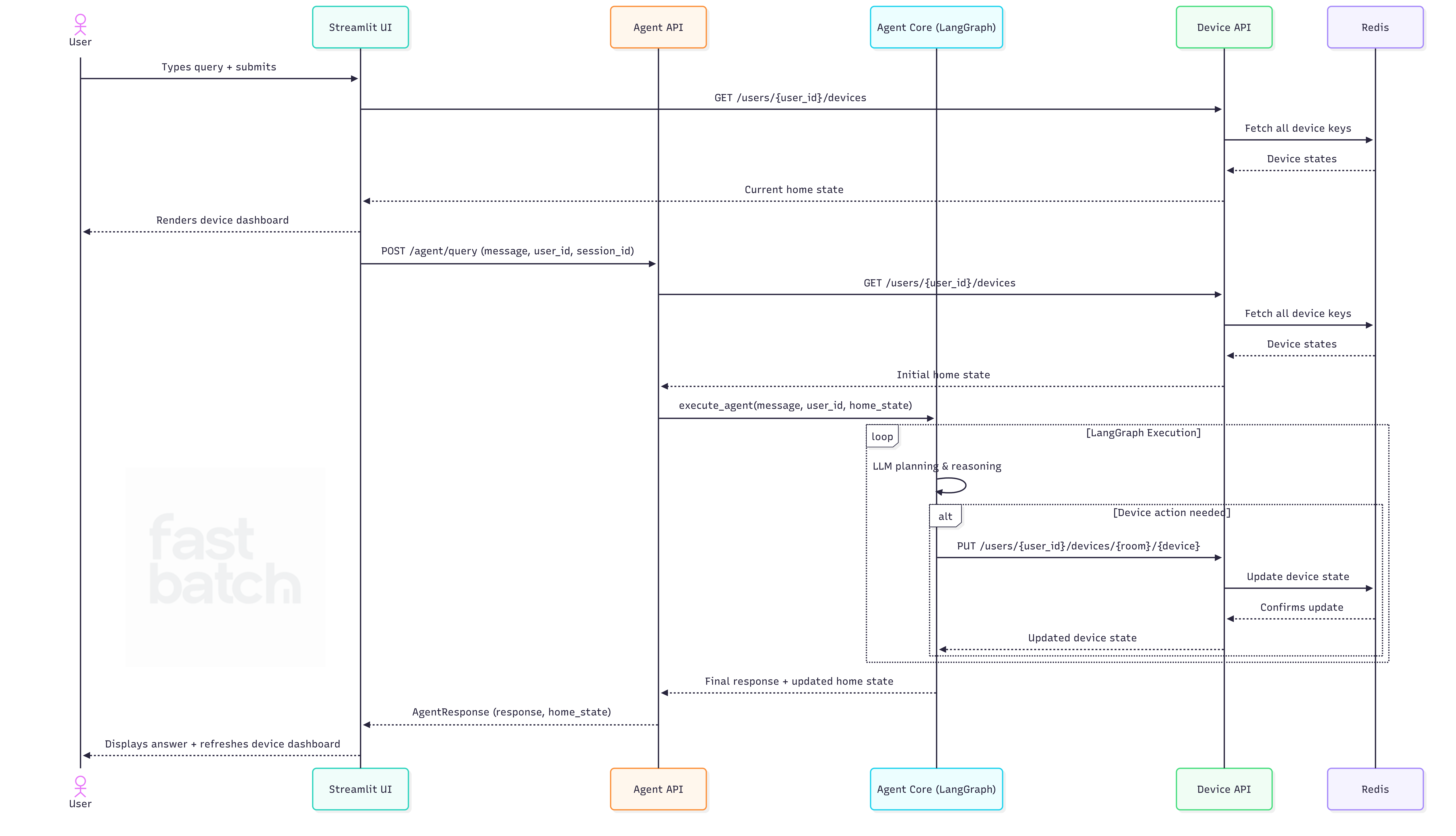
Backend: Device Management API
In earlier lessons, we used a static JSON file to represent home and device status. That's fine for prototyping, but it breaks down fast in production. You can't safely handle concurrent access with a JSON file, and it's prone to corruption when multiple users are interacting with the system at the same time.
This is why, I introduced a Device State Service backed by Redis. Redis gives us fast read/write operations and handles concurrent access gracefully (no manual locking needed). The implementation still makes some simplifying assumptions, but it reflects a realistic production setup where the agent interfaces with a dedicated service to query and update device state.
Building this service is essential because it centralizes the device states for all the components. The agent no longer controls this part which ensures our architecture is modular.
API endpoints
Get all devices for a user : used to populate the agent's context and refresh the UI:
Update a specific device in a room: used by the update_device tool.
Updating Tools
Previously, the update_device tool modified in-memory state. Now it performs an HTTP call to the Device Service. This makes the tool stateless and infrastructure-aware.
@tool
async def update_device(*args) -> Command:
    # ...
    async with httpx.AsyncClient() as client:
        resp = await client.put(
            f"{config.DEVICE_SERVICE_URL}/users/{user_id}/devices/{room_name}/{device_name}",
            json={"status": new_device_info}
        )
        if resp.status_code != 200:
            return f"Failed to update device via service: {resp.text}"
        updated_device = resp.json()
    # ... rest of tool as before
When the agent initializes, it fetches the latest home state from the service. During the session, it relies on its in-memory state to avoid repeated service calls. This is a reasonable strategy for our use case as smart home interactions tend to be short. In more complex systems, you would need real-time synchronization.
Deployment
Each component above is deployed independently. This keeps our architecture flexible, easy to maintain, and scalable. Each service can evolve on its own without disrupting the others.

For local deployment, we're using Docker Compose. The boot order matters: the device-service-api comes up first since both the agent and the UI depend on it. Then the agent-api is launched, followed by smarthome-ui. You can check the full Docker Compose file here.
If you want a visual way to inspect and manage your running containers locally, Portainer is a lightweight UI that sits on top of Docker and lets you monitor container health, check logs, and restart services without touching the command line (see figure above).
To build and launch all services:
make upIn a production setup, this could be migrated to a cloud provider such as AWS. We will discuss cloud deployment in subsequent lessons.
Additional production considerations:
Shipping a service is just the beginning. Here's what we'd need to harden before going to production:
Configuration management: We use environment variables and a .env file for configuration. In production, sensitive values like API keys and passwords should live in a secrets manager (e.g., AWS Secrets Manager) and never be baked into your codebase or Docker image.
Logging and monitoring: Logging is critical for debugging and understanding system behavior. Tools like Prometheus and Grafana let you track key metrics: API response times, error rates, and service latency. You'll also want alerts set up for critical failures like service crashes.
Health checks and auto-restarts: In production, services are typically managed by orchestrators like Kubernetes, which rely on liveness and readiness probes to detect failures and restart containers. This is exactly why the health check endpoints in our agent and device services matter.
Security: Our current implementation is minimal and not production-ready in this area. We use a basic Streamlit authenticator for login. A real deployment would require robust identity verification and session management. Backend services must also validate incoming request tokens before executing commands or updating device states. Only authorized users or services should be able to interact with sensitive resources. Finally, the agent currently has no guardrails against malicious inputs or prompt injection attacks.
CI/CD: Automated pipelines are essential for maintaining a reliable system. CI runs your tests automatically on every push to catch regressions early. CD handles building Docker images and deploying them to the target environment without manual intervention.
Conclusion
We now have a fully deployable smart home agent with memory, tools, a web interface, and production-ready service architecture. Not bad for a few lessons in.
In the next lesson, we’ll look at how to evaluate and improve the agent’s performance more rigorously. We’ve been testing manually so far, but as the system grows more complex, we need a more systematic approach. We’ll cover how to build an evaluation framework that lets you measure what matters and iterate with confidence.
See you in the next one.